How to copy a Facebook campaign to another ad account
By Matheus Mello, founder of Ads Editor and owner of YEP Agência · Published · 7 min read
To copy a Facebook campaign to another ad account, Meta does not give you a button: the native path is exporting the campaign to a spreadsheet and importing it into the destination account. It works for a one-off copy, and it quietly goes wrong when the Page, pixel and audiences still point to the source account.
Quick answer
To copy a Facebook campaign to another ad account natively, export it to a spreadsheet, clear the Campaign, Ad Set and Ad ID values, swap Page, Instagram, pixel and audiences, switch to the destination account and import. History and learning do not travel. For weekly copies, use a cross-account copy that swaps identity in one step.
Summary
- There is no native button to move or duplicate a campaign into a different ad account; you export, edit and import.
- Page, Instagram account, pixel, WhatsApp number and custom audiences all belong to the source account and must be replaced.
- Learning, delivery history and post engagement never come along; plan budget for a fresh learning phase.
- Ads Editor copies across accounts in one action and remaps custom audiences by name.
- Copying is also the cleanest way to move a winner from ABO to CBO or to change the objective.
Why does copying a campaign between accounts go wrong so often?
A campaign carries the identity of the account it lives in: the Facebook Page, the Instagram account, the pixel (dataset), the WhatsApp number and the custom audiences. None of those exist with the same ID in the destination account. If the copy does not replace every one of them, the ad runs with another client's Page or optimizes for a pixel that does not belong to that website.
That is why, in day to day agency work, a native copy between accounts is not really a copy. It is a new build with a similar name.
How do you copy a campaign to another ad account in Ads Manager?
There is no copy to another account button. The native path is export and import, and it handles an occasional copy well. You need access to both accounts, and it only works on desktop.
- Export. In the source account, select the campaign (or the ad sets and ads) and export the selected items from the import and export menu. This exports the setup, not a results report.
- Clear the IDs. In the spreadsheet, clear the values in the Campaign ID, Ad Set ID and Ad ID columns. Keep the headers: Meta reads columns by exact name.
- Swap what belongs to the source. Page ID, Instagram account, pixel and custom audiences. None of them exist with the same ID in the destination.
- Switch to the destination account. Importing while the source account is still open is the classic mistake, and it throws a pixel error.
- Import. Open the import and export menu again and choose Import ads in bulk. The file limit is about 2 MB.
- Fix and review. Errors block a row; warnings let it through. Review every ad set and ad before publishing.
Export fails with multiple headlines
If an ad uses Advantage+ creative text generation with several headlines, the export can fail or come out empty. Turn off the manual and automatic text generation options before exporting.
What does not come along when you export and import?
| Item | What happens in a native copy | What to do |
|---|---|---|
| Delivery history and learning | Nothing carries over. The campaign starts fresh in the new account | Budget for a new learning phase |
| Post likes and comments | They stay on the original post | Expect social proof to start at zero in another client's account |
| Images and videos | Image hashes and video IDs belong to the source account | Upload the files again or bring them through the media library |
| Page, Instagram, pixel and audiences | They keep the source IDs unless you change them | Swap them in the spreadsheet, row by row |
| WhatsApp number | Stays the source client's number if nobody changes it | Check the destination of every messaging ad set |
| File size | About 2 MB, which dynamic creative fills quickly | Split the import into parts |
The native route is fine for one campaign, once, for one client. It wears you down when copying becomes routine: several accounts a week, messaging campaigns and audiences you have to find one by one. And the mistake is silent: the campaign runs, spends and measures on the wrong pixel.
What does a cross-account copy in Ads Editor do differently?
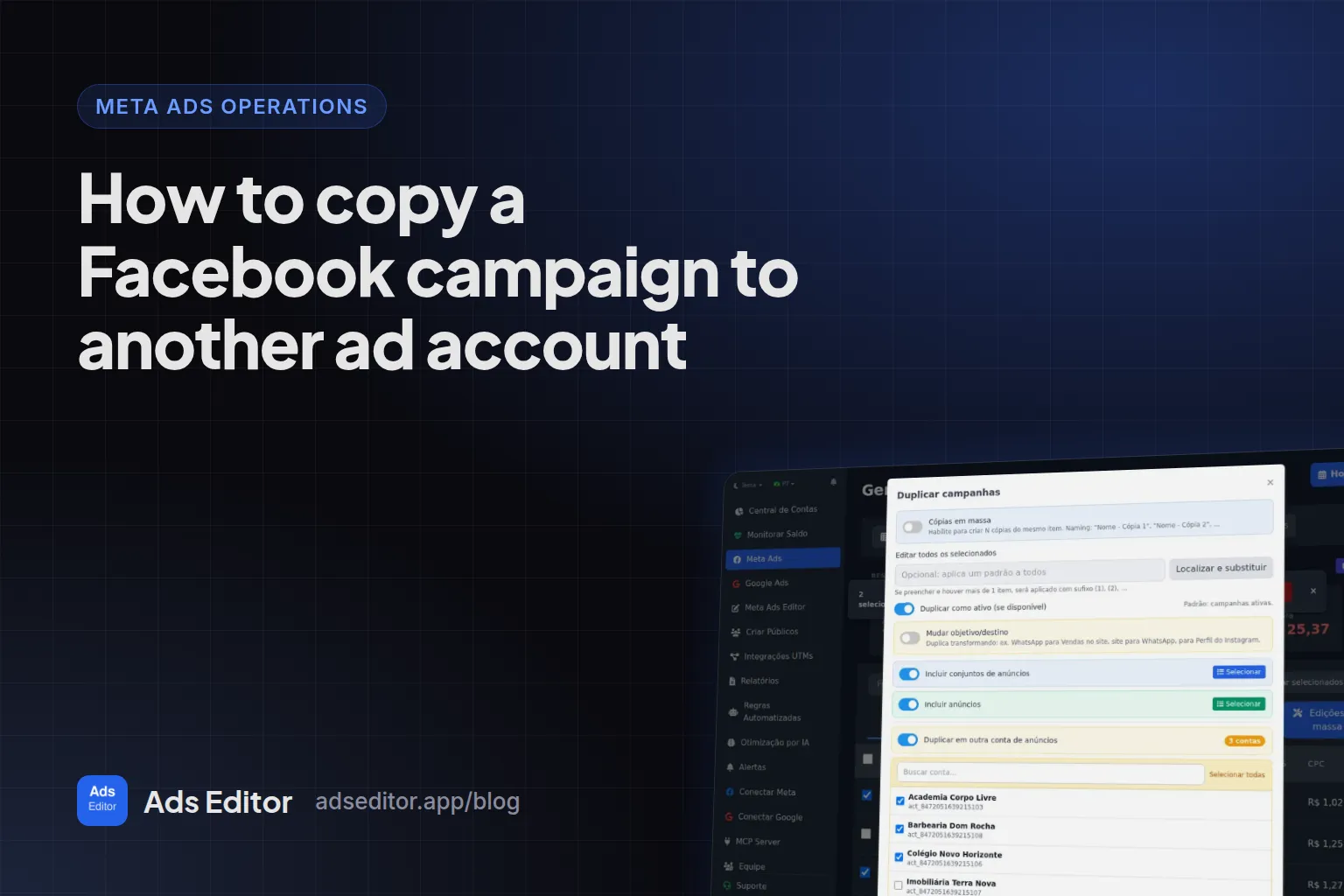
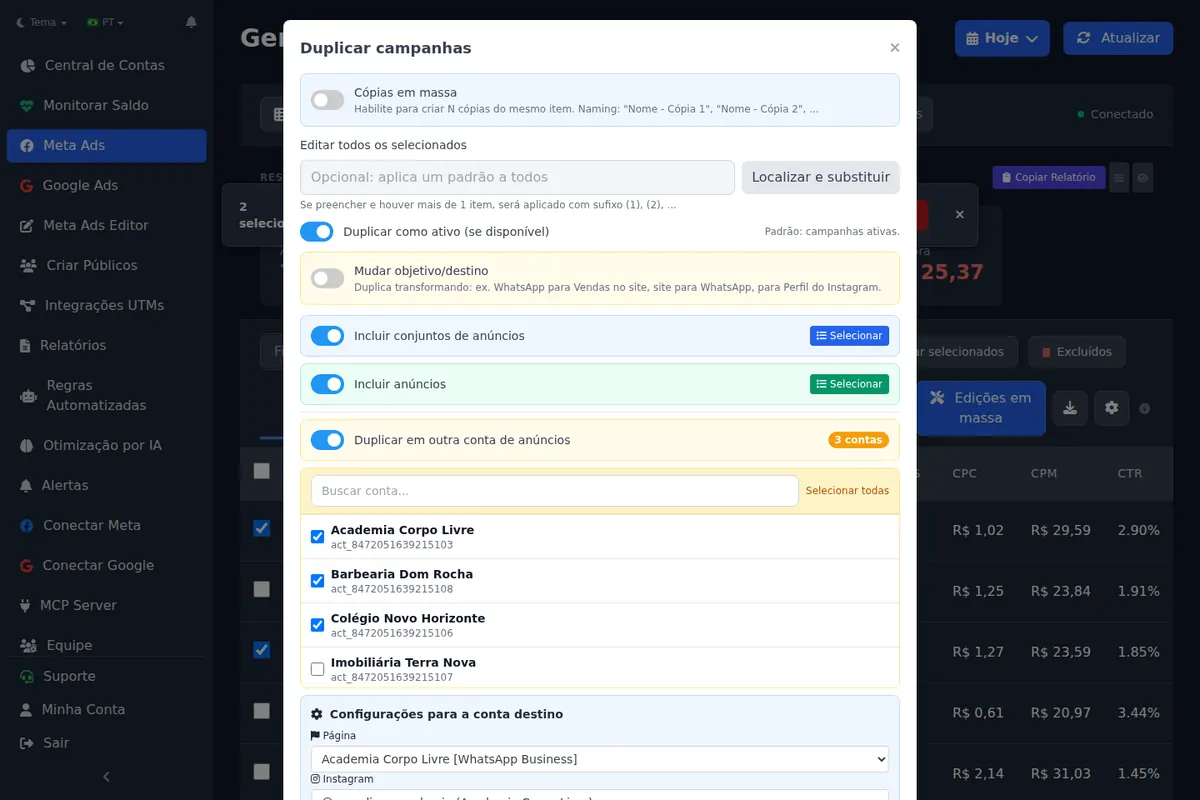
In Duplicate to another account, you choose the destination account and what to bring (ad sets and ads). In the destination settings you set the Page, Instagram account, pixel and WhatsApp number. Every swap happens in the same operation.
What happens to custom audiences?
A custom audience belongs to the ad account. During the copy, Ads Editor looks in the destination account for an audience with the same name (ignoring accents, letter case and the Instagram handle suffix) and swaps the ID. Anything without a match is flagged as not found.
Operations tip
Before copying, create the same audiences with the same names in the destination account. Creating custom audiences in bulk does it in one action, and the copy then finds everything on its own.
What if it is a WhatsApp campaign?
The copy detects the destination number from active ad sets, from the Page's phone number or from a wa.me link on the website, and you can override it with the new client's number.
Can you duplicate and change the objective at the same time?
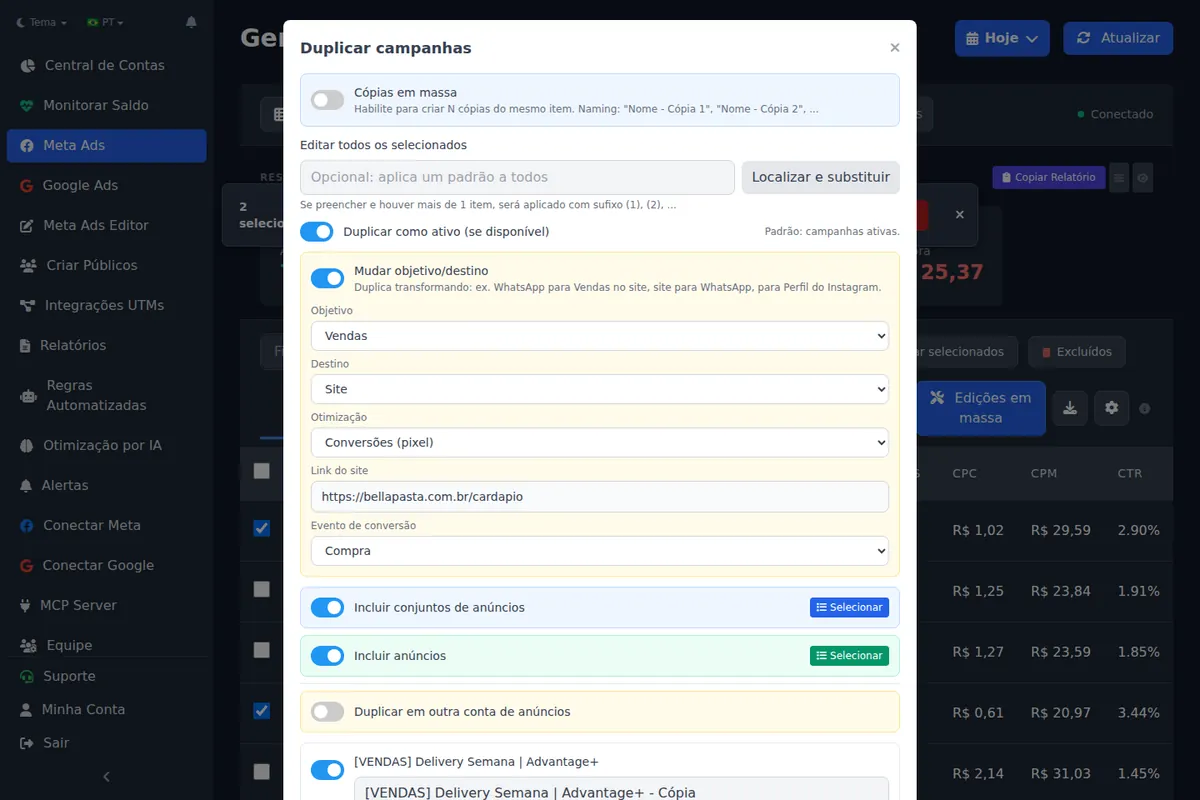
Yes, and it solves another common request: turning a website campaign into a WhatsApp campaign, or a sales campaign into a messaging one, without rebuilding the ad sets. The duplicate flow has a Change objective and destination option that adjusts the optimization goal to one compatible with the new objective.
Is copying the right way to move from ABO to CBO?
It is one of the best uses. Changing the budget structure of a running campaign is a significant edit and restarts learning. Many media buyers prefer to duplicate the winning ad sets into a new campaign already built the right way and leave the original untouched. The full reasoning is in CBO vs ABO. One more reason to keep campaigns lean: Meta documents that a campaign with more than 70 ad sets on Advantage campaign budget cannot turn that budget off or change its bid strategy.
Measured: June 25 to September 23, 2026
1,155 campaigns and 296 ad sets were copied by 25 Ads Editor user accounts. Another 638 actions moved ads or ad sets to a different campaign or ad set. Copies between August 30 and September 3 were not logged.
For the operation around this, read how to manage multiple Facebook ad accounts.
Frequently asked questions
Can you copy a Facebook campaign to another ad account?
Not with a button. The native path is exporting the campaign to a spreadsheet, clearing the ID columns, swapping Page, Instagram, pixel and audiences, and importing it in the other account with Import ads in bulk.
Do custom audiences come along in the copy?
Audiences belong to the account. Ads Editor remaps them by name: if the destination account has an audience with the same name, the copy uses it.
Does the copied campaign start learning from zero?
Yes. A new campaign in another account inherits no delivery history. What it inherits is the structure, which saves the build.
Can I copy into several accounts at once?
The copy runs per destination account. To send the same creative pack into several accounts, use bulk publishing.
Glossary
- Pixel (dataset)
- The Meta tracking object that records website events; each ad account uses its own.
- Significant edit
- A change Meta treats as large enough to send an ad set back into the learning phase.
- Advantage+ creative text generation
- Meta's option that generates text variations for an ad; it can break spreadsheet exports.
References
- Migrate Meta ads between ad accounts (Victor Serban). Supports: Native steps: export ads to a spreadsheet, clear Campaign ID, Ad set ID and Ad ID, switch to the target account before importing to avoid pixel errors, and remove Advantage+ creative text generation when multiple headlines break the export.
- Advantage campaign budget (Meta for Developers). Supports: A campaign with more than 70 ad sets using Advantage campaign budget cannot edit its bid strategy or turn off Advantage campaign budget.
Links opened and checked when the article was last updated.
About the author
Matheus Mello, founder of Ads Editor and owner of YEP Agência. Runs client ad accounts at YEP Agência and built Ads Editor so his own agency could stop publishing ads one at a time. Usage numbers quoted on the blog come from the product activity log. Instagram: @theusm