Meta Ads sales don't match your sales platform: why it happens and how to compare
By Matheus Mello, founder of Ads Editor and owner of YEP Agência · Published · 9 min read
Meta Ads sales almost never match the numbers in Shopify, ClickBank, Hotmart or whatever sales platform you use, and that does not mean one of them is wrong. Each side counts a sale by a different rule. This article explains where the gap comes from, how much of it is normal and how to compare the two counts campaign by campaign.
Connect my sales platformQuick answer
Meta Ads sales don't match your sales platform because Meta credits a purchase to anyone who clicked the ad within 7 days or saw it in the last day, while the platform only recognizes a sale that arrived with UTMs. Compare both counts per campaign and investigate only the gap that breaks the account's usual pattern.
Summary
- Meta counts a purchase by its attribution window; the sales platform counts by the UTMs that reached checkout.
- Meta can overcount (someone saw the ad and bought through another path) and undercount (ad blockers, iPhone, declined cookies).
- UTMs get lost in redirects, links without parameters and checkouts opened on another device.
- In Ads Editor, the Attribution section shows Meta purchases next to sales with UTMs, campaign by campaign.
- The gap itself is normal. The warning sign is when its size changes from one week to the next.
In this article · 7 sections
Why don't Meta Ads sales match the sales platform?
Because they are two different rulers. Ads Manager answers the question "how many purchases happened after someone interacted with my ad?". Shopify, ClickBank, Hotmart or any other sales platform answers another one: "which link did this order come from?". Both answers are true, and they rarely produce the same number. If the store runs on Shopify, see how to track Shopify sales from Facebook ads to get the order side of the comparison.
| Purchases in Meta | Sales with UTMs in the platform | |
|---|---|---|
| How the sale is tied to the ad | Through the pixel or the Conversions API, inside the attribution window | Through the UTM parameters that made it to checkout |
| Counts people who only saw the ad | Yes, with the default setting (view in the last day) | No |
| Counts people who clicked and bought days later | Yes, up to 7 days after the click with the default setting | Only if the UTMs were still on the purchase link |
| What makes a sale go missing | Ad blockers, iPhone, declined cookies | Redirects, links without UTMs, switching devices |
| Refunds | The purchase stays counted | It leaves the approved sales number |
That is why the gap shows up in both directions. In one campaign Meta reports 30 purchases and the platform reports 24. In another, Meta reports 8 and the platform 11. Neither scenario proves a setup mistake.
When does Meta count more sales than the platform?
- The person saw the ad and bought through another path. They saw the creative in the morning, searched for the brand at night and bought through the link in bio. Meta counts the view; the platform receives a sale with no campaign UTMs.
- The person clicked and came back days later. They clicked on Monday, got the abandoned cart email on Thursday and bought from it. For Meta, the click is still inside the 7 days.
- The UTMs got lost along the way. A bridge page, a link shortener or a redirect that does not pass the parameters forward makes the sale arrive with no source.
- Checkout opened on another device. Click on the phone, purchase on the computer: the UTMs stayed on the first one.
- The ad went out without UTMs. An ad duplicated or created in a hurry, with a clean link, identifies no sale at all.
When does the platform count more sales than Meta?
- The browser blocked the pixel. Ad blockers, private browsing and iPhone restrictions keep Meta from seeing the purchase, but the UTMs reach checkout as usual.
- The person declined cookies. Without consent, the purchase event may never be sent.
- The purchase happened outside the window. Someone who clicked ten days ago and bought today with the same link still carries the UTMs, but is already outside Meta's 7-day window.
- The purchase event does not fire on every sale. Payments that are only confirmed later, or a thank-you page that does not always load, leave purchases out of the pixel. The Conversions API reduces that loss.
A normal gap and a gap that needs fixing
There is no correct percentage for every account. What you should track is your own pattern: if Meta usually shows a little more than the platform and suddenly shows twice as much, or half, something changed in the pixel, the link or the checkout.
How do you compare the two counts campaign by campaign?
Comparing account totals hides the problem. A campaign with broken UTMs disappears inside the sum of the others. The comparison that helps is per campaign, over the same period, with both columns side by side.
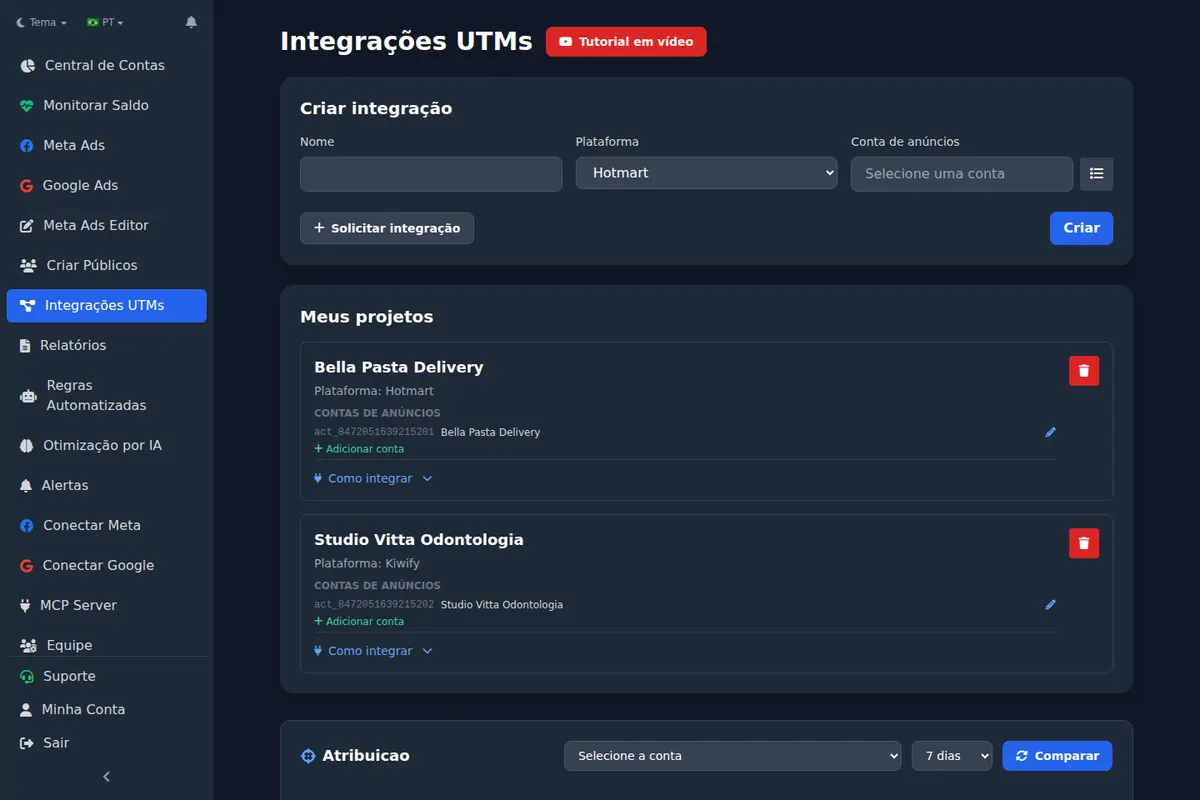
In Ads Editor, that comparison lives in the Attribution section, inside UTM Integrations, and it is available on every plan. It depends on the ad account being linked to an integration project, which is how the sales from your platform come in. Supported sales platforms include Shopify, WooCommerce, Stripe, ClickBank, Digistore24 and Hotmart: each sale arrives by webhook. For Hotmart, the setup is in the Hotmart integration guide. The UTM template itself is covered in UTM parameters for Facebook ads.
- Open UTM Integrations and go to the Attribution section.
- Pick the Meta ad account. If only one is linked to a project, it comes selected.
- Pick the period: 7, 14, 30 or 90 days.
- Click Compare.
For each campaign, the table shows the purchases Meta attributes to the ads and the sales that arrived with UTMs. The Discrepancy column is the difference between the two: positive when Meta counted more, negative when it counted fewer. Real CPA and Real ROAS use the sales with UTMs and the Meta spend. The Sales without UTM row gathers the sales in the period that arrived with no identified campaign.
How do you read the discrepancy?
| What you see | Most likely cause | What to check |
|---|---|---|
| A campaign with many purchases in Meta and almost no sales with UTMs | Ads without UTMs, or a link that drops the parameters | Open an ad from the campaign, click it and see whether the UTMs reach checkout |
| A very high Sales without UTM row | Organic, email and affiliate sales, or lost UTMs | Compare with the volume the account had before advertising |
| Meta showing fewer purchases in every campaign | Blocked pixel, or a purchase event that does not always fire | Check the event in Events Manager and the Conversions API |
| The discrepancy changed size from one week to the next | A new page, a new checkout or a new link template | Look at what changed in the funnel on the date the gap shifted |
| Spend in the period and no sales with UTMs | The integration is not receiving sales, or the ads have no parameters | Check that the platform webhook is active and that the campaigns carry UTMs |
Which number should drive budget decisions?
Use both, each for one job. Meta's count is the one its algorithm sees, so it explains delivery and the learning phase. The UTM count is the one that matches the money that came in, with refunds already taken out, so it answers whether the campaign pays for itself.
In practice: decide pauses and budget increases by the CPA and ROAS calculated on real sales, and use Meta's column to understand why a campaign stopped delivering. When the two point in opposite directions, the discrepancy table shows which campaign is worth investigating before you touch anything. That same real sales number can feed your automated rules and the client report.
How do you shrink the gap?
- Standardize UTMs on every ad. One template, applied in bulk, prevents the ad that goes live with a clean link.
- Test the whole path. Click the ad, go all the way to checkout and confirm the parameters are still in the address.
- Avoid redirects that discard parameters. Link shorteners and bridge pages are the usual culprits.
- Turn on the Conversions API. It sends the purchase from the server and recovers part of what the browser blocks.
- Always compare the same period and the same time zone. A sale in the middle of the night can fall on different days in each system.
The gap will not go to zero, and it does not need to. The goal is a gap that is stable and explainable, so a real change shows up fast.
Step by step in Ads Editor
Help Center articles that walk through this task screen by screen:
Frequently asked questions
Is it normal for Meta Ads to show more sales than Shopify, ClickBank or Hotmart?
Yes. With the default setting, Meta counts anyone who clicked the ad in the last 7 days or saw it in the last day, even if the person bought through another link. The platform only ties the sale to the campaign when the UTMs reach checkout.
What if the platform shows more sales than Meta?
That is normal too. Ad blockers, iPhone restrictions and declined cookies keep Meta from recording part of the purchases, while the UTMs stay on the link and the sale shows up in the platform.
Which number should I show the client?
Real sales, which match what the client received, with a note that Meta's count follows a different rule. Showing both columns side by side avoids the argument about which one is right.
Does the Ads Editor attribution comparison work for Google Ads?
No. The Attribution section compares Meta purchases with sales by UTM and lists only Meta accounts linked to an integration project.
Which plan do I need to use Attribution?
No specific one. The Attribution section, in UTM Integrations, is available on every Ads Editor plan.
Glossary
- Attribution window
- How long Meta credits a purchase to the ad after a click or a view. The default is 7 days after the click and 1 day after the view.
- UTM
- Parameters added to the ad link that identify the source of the visit and, when they reach checkout, the source of the sale.
- Discrepancy
- The difference between the purchases Meta attributes to a campaign and the sales with UTMs the platform recorded in the same period.
- Sales without UTM
- Approved sales in the period that arrived with no identified campaign, either because they were organic or because the parameters were lost along the way.
References
- Google Analytics Help: URL builders and custom URL parameters (UTM). Supports: Definition of the utm_source, utm_medium, utm_campaign and utm_content parameters used to identify the source of a visit.
- Meta for Developers: Conversions API. Supports: The Conversions API sends server events to Meta's systems, complementing the browser pixel.
The claim supported by each source is shown above.
About the author
Matheus Mello, founder of Ads Editor and owner of YEP Agência. Runs client ad accounts at YEP Agência and built Ads Editor so his own agency could stop publishing ads one at a time. Usage numbers quoted on the blog come from the product activity log. Instagram: @theusm